Internet News
Agent Orchestration UI
Quite quickly, AI products have transitioned from models behind the scenes powering features to people talking directly to models (chat) to models deciding which tools to use and how (agents) to agents orchestrating other agents. Like the shifts that came before it, orchestration is a another opportunity for new AI products and UI solutions.
I charted the transition from AI models behind the scenes to chat to agents last year in The Evolution of AI Products. At the time, we were wrestling with how to spin up sub-agents and run them in the background. That's mostly been settled and agent orchestration (coordinating and verifying the work of multiple agents on unified tasks) is today's AI product design challenge. As Microsoft CEO, Satya Nadella put it:
"One of the metaphors I think we're all sort of working towards is 'I do this macro delegation and micro steering [of AI agents]'. What is the UI that meets this new intelligence capability? It's just a different way than the chat interface. And I think that would be a new way for the human computer interface. Quite frankly, it's probably bigger."He's right. When you have multiple agents working together, you need more than a conversation thread as anyone that's tried to manage a team through a single Slack or email thread can attest.
Introducing IntentIntent by Augment (in early preview today) is a new software development app with agent orchestration at its core. You're not managing individual model calls or chat threads. You're setting up workspaces, defining your intent (what you want to get done), and letting specialized agents work in parallel while staying aligned.
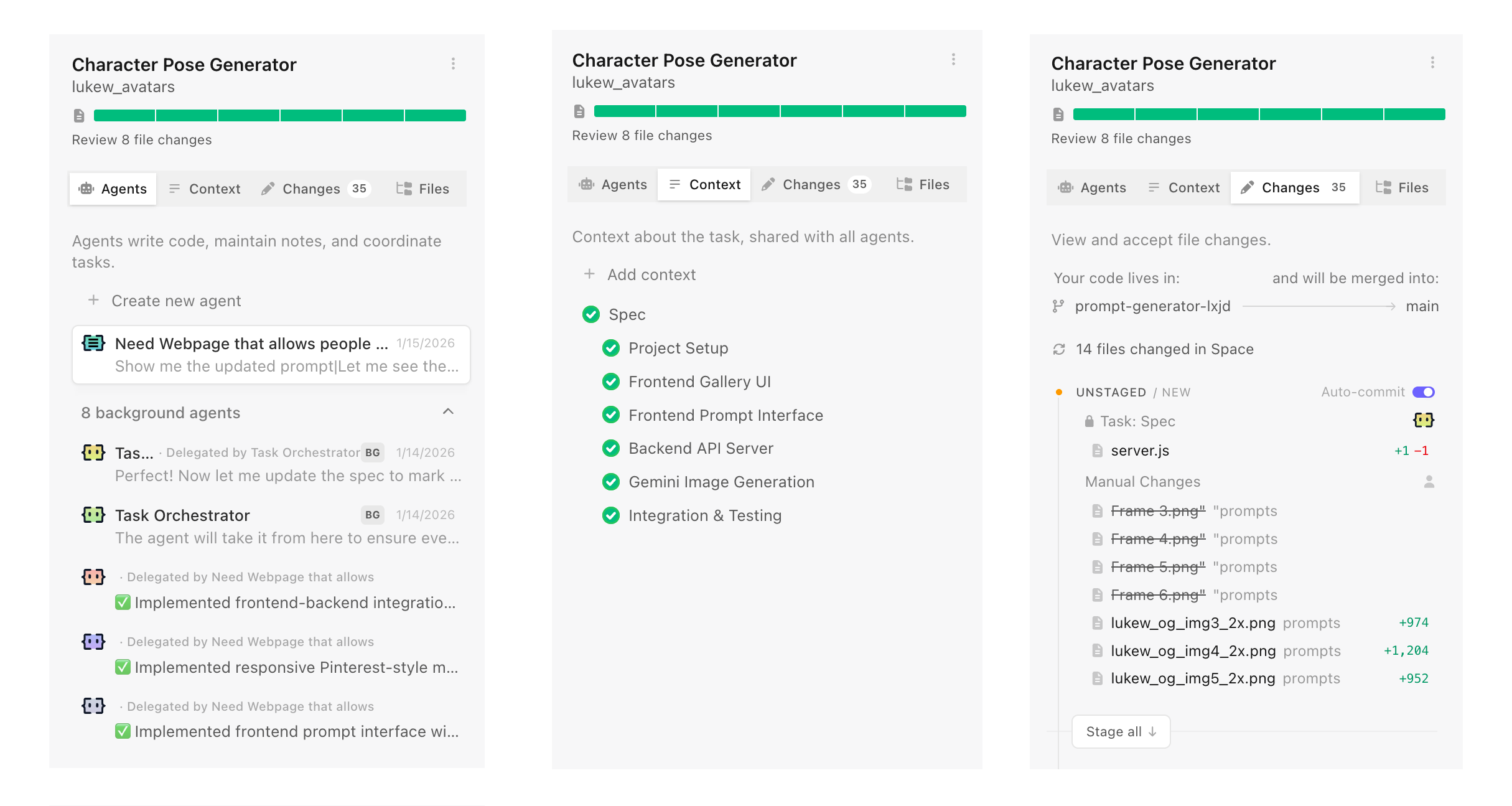
To ground this in a real-world analogy, if you want to accomplish a large or complicated task you need...
- A team of the right people for the job, often specialists
- To give the team the information they need to complete the job
- The right environment where the team can coordinate and work safely
That's a space in Intent in a nutshell. Software developers create a new space for every task they want to get done. Each space makes use of specific agents and context to complete the task. Each space is isolated using git worktrees so agents can work freely and safely. Fire up as many spaces as you want without having them interfere with each other.
I've often said "context is king" when talking about what makes AI products effective. That's especially true when you need to coordinate the work of multiple parallel agents with varying capabilities. In Intent, context is managed by a living spec which provides a shared understanding that multiple agents can reference while working on different parts of a problem. This living spec is written and updated by a coordinator agent as it manages the work of implementer and verifier agents. It's a whole agent dev team.
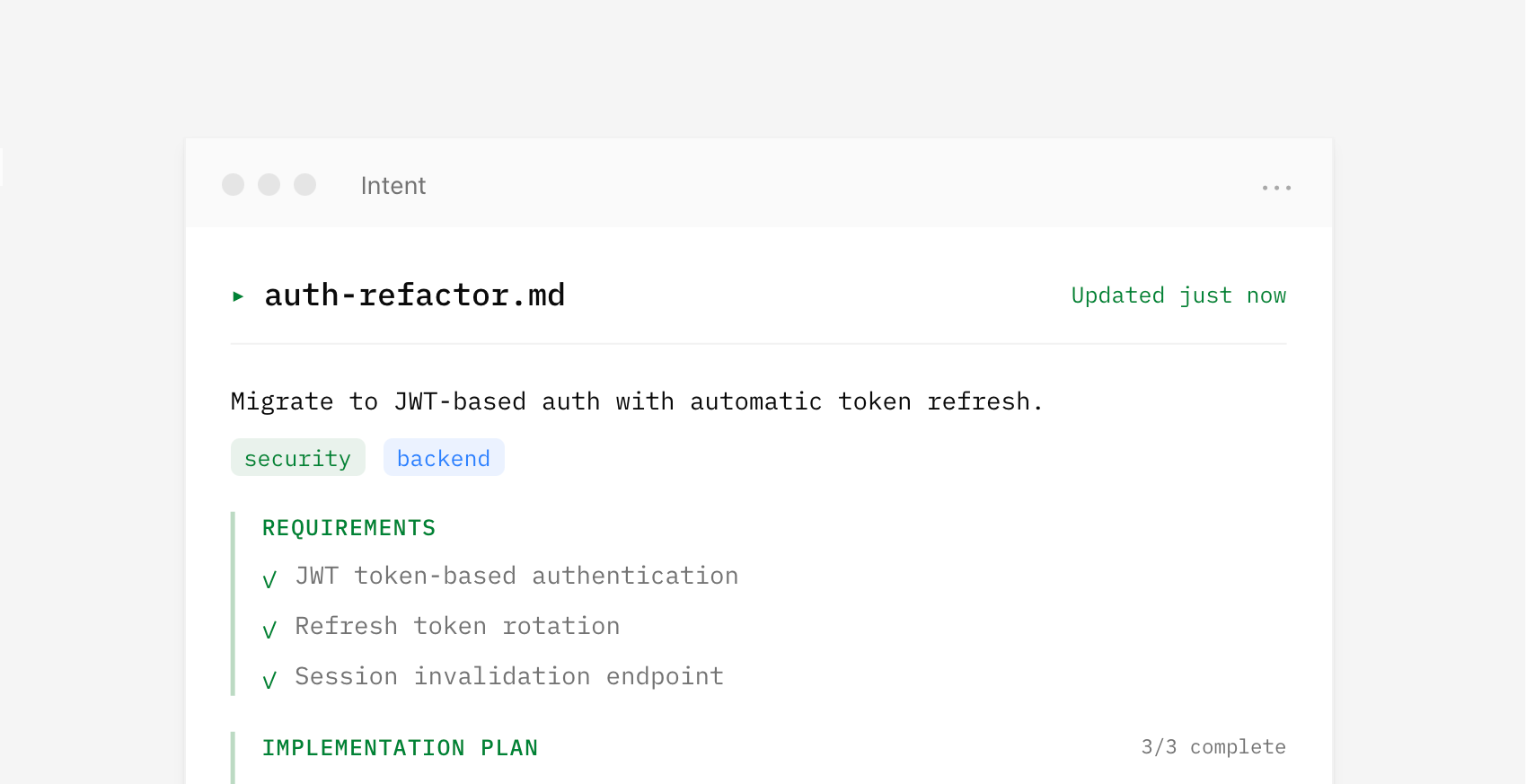
Because agents operate from the same spec, parallel work becomes possible. Assumptions, tradeoffs, and decisions stay aligned and updated as code changes without requiring constant human intervention to keep things on the same page. For instance, one agent handles the theme system while another works on component styles. Both reference the same context, so their work fits together.
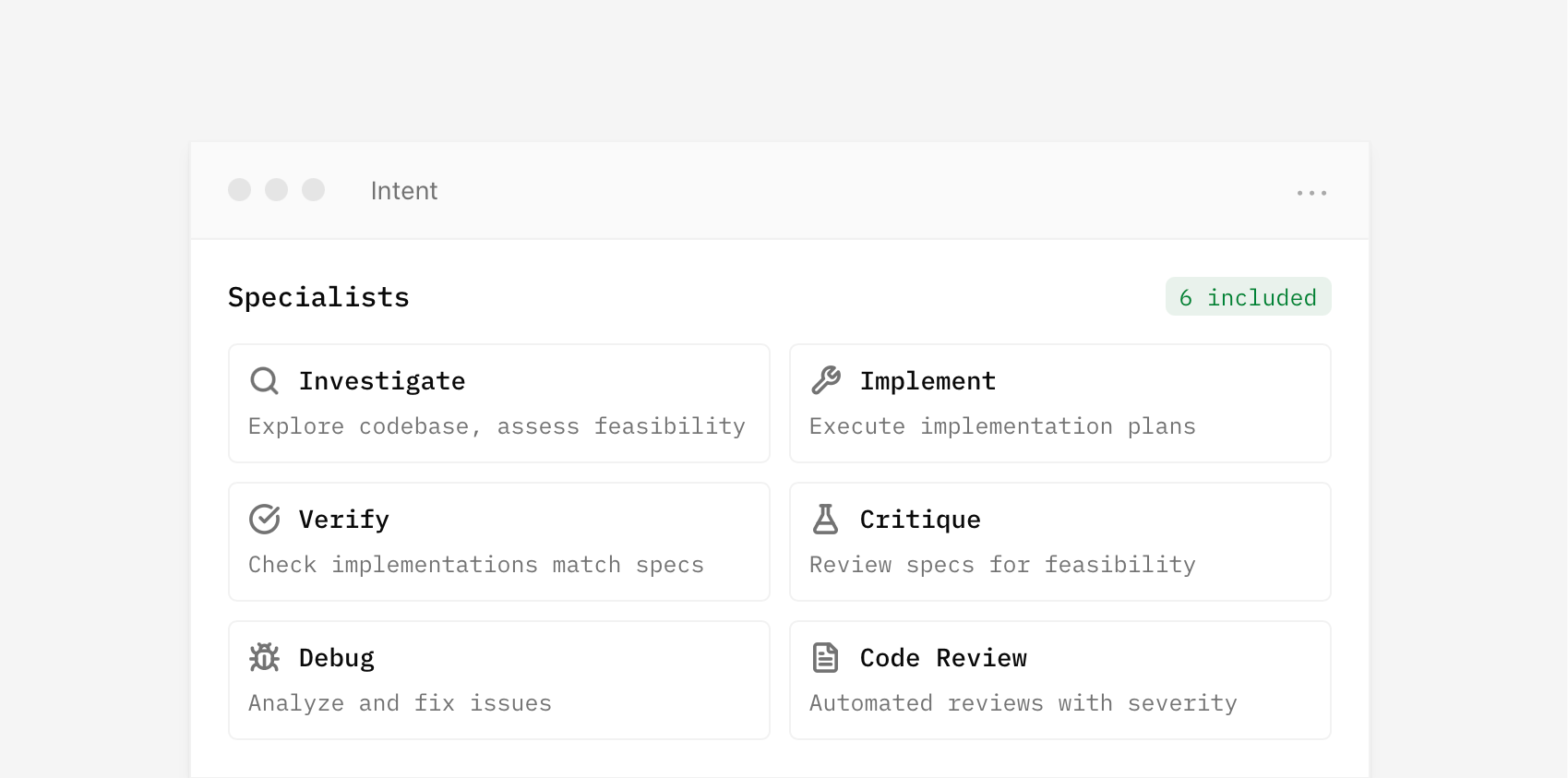
By default, a coordinator writes a spec and delegates to specialists for you. But you can also set up spaces with custom agents and manage your own context if you want. Think of it as manual vs. auto mode.
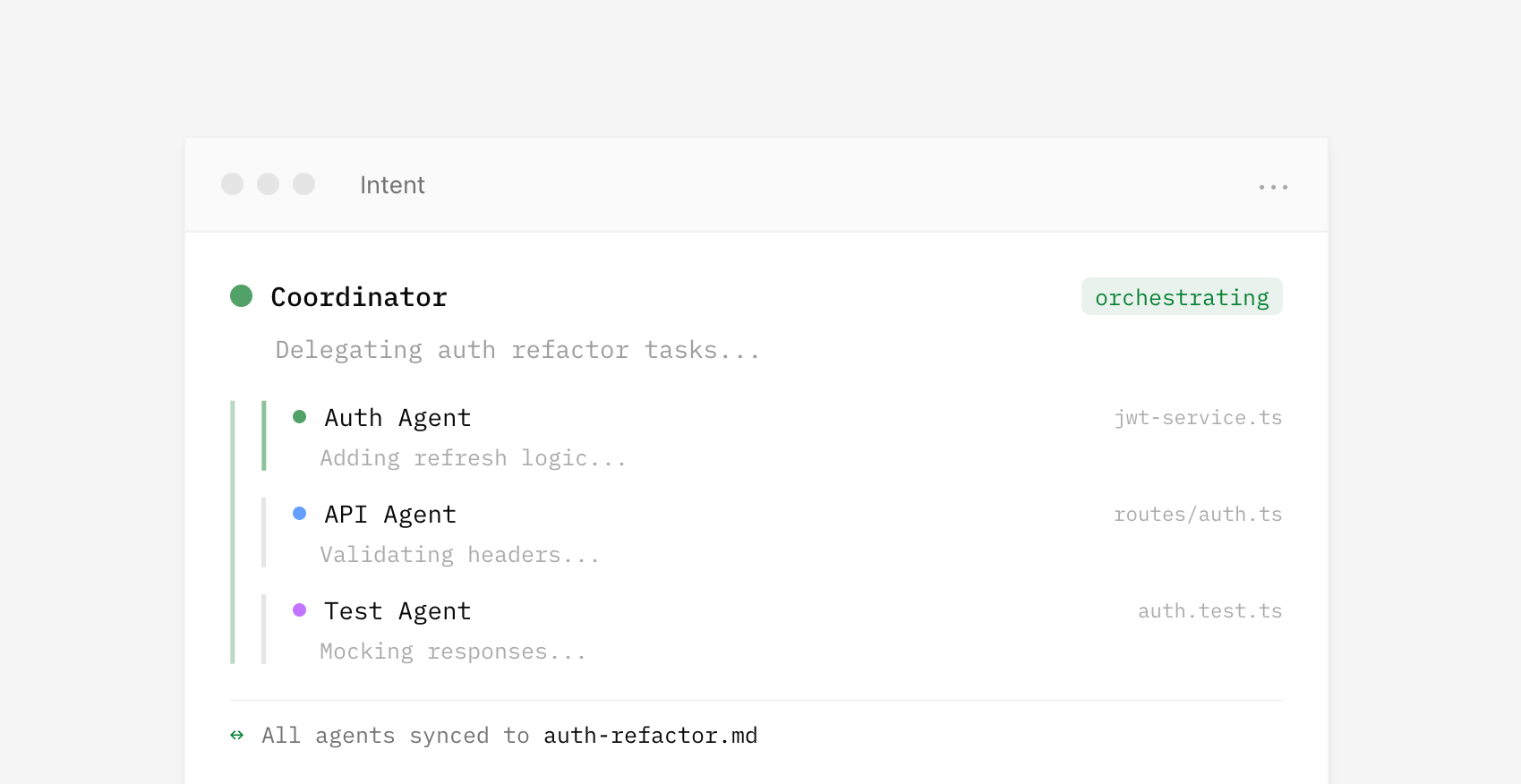
The UI for agent orchestration in Intent isn't a fancier chat interface. It's context management, agent specialization, and a unified developer workflow. It's not hard to squint and see very similar orchestration UI being useful for lots of other domains too.
Design Tools Are The New Design Deliverables
Design projects used to end when "final" assets were sent over to a client. If more assets were needed, the client would work with the same designer again or use brand guidelines to guide the work of others. But with today's AI software development tools, there's a third option: custom tools that create assets on demand, with brand guidelines encoded directly in.
For decades, designers delivered fixed assets. A project meant a set number of ads, illustrations, mockups, icons. When the client needed more, they came back to the designer and waited. To help others create on-brand assets without that bottleneck, designers crafted brand guidelines: documents that spelled out what could and couldn't be done with colors, typography, imagery, and layout.
But with today's AI coding agents, building software is remarkably easy. So instead of handing over static assets and static guidelines, designers can deliver custom software. Tools that let clients create their own on-brand assets whenever they need them.
This is something I've wanted to build ever since I started using AI image generators within Google years ago. I tried: LoRAs, ControlNet, IP-Adapter, character sheets. None of it worked well enough to consistently render assets the right way. Until now.
LukeW Character MakerSince the late nineties, I've used a green avatar to represent the LukeW brand: big green head, green shirt, green trousers, and a distinct flat yet slightly rendered style. So to illustrate the idea of design tools as deliverables, I build a site that creates on-brand variations of this character.
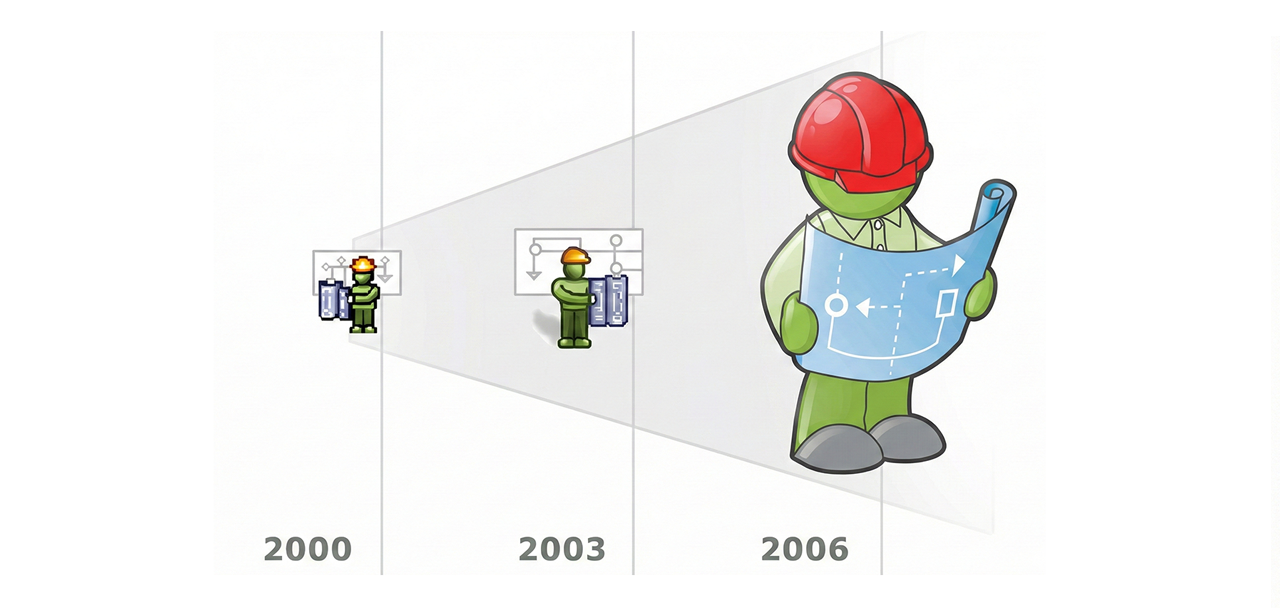
The LukeW Character Maker allows people to create custom LukeW characters while enforcing brand guidelines: specific colors, illustration style, format, and guardrails on what can and can't be generated. Have fun trying it yourself.
How It WorksSince most people will ask... a few words on how it works. A highly capable image model is critical. I've had good results using both Reve and Google's Nano Banana but there's more to it than just picking an image model.
People's asset creation requests are analyzed and rewritten by a large language model that makes sure the request aligns with brand style and guidelines. Each generation also includes multiple reference images as context to keep things on rails. And last but least, there's a verification step that checks results and fixes things when necessary. For instance, Google's image generation API ignores reference images about 10-20% of the time. The validation step checks when that's happening and re-renders images when needed. Oh, and I built and integrated the software using Augment Code.
The LukeW Character Maker is a small (but for me, exciting) example of what design deliverables can be today. Not just guidelines. Not just assets. But Tools.
AI Enables As-Needed Software Features
In traditional software development, designers and engineers anticipate what people might need, build those features, and then ship them. When integrated into an application, AI code generation upends this sequence. People can just describe what they want and the app writes the code needed to do it on demand.
Reve's recent launch of Effects illustrates this transition. Want a specific film grain look for your image or video? Just describe it in plain language or upload an example. Reve's AI agent will write code that produces the effect you want and figure out what parameters should be adjustable. Those parameters then become sliders in an interface built for you in real-time.
Instead of having to find the menu item for an existing filter (if it even exists) in traditional software, you just say what you want and the system constructs it right then and there.
When applications can generate capabilities on demand, the definition of "what this product does" becomes more fluid. Features aren't just what shipped in the last release, they're also what users will ask for in the next session. The application becomes a platform for creating its own abilities, guided by user intent rather than predetermined roadmaps.
More on Context Management in AI Products
In AI products, context refers to the content, tools, and instructions provided to a model at any given moment. Because AI models have context limits, what's included (aka what a model is paying attention to) has a massive impact on results. So context management is key to letting people understand and shape what AI products produce.
In Context Management UI in AI Products I looked at UI patterns for showing users what information is influencing AI model responses, from simple context chips to nested agent timelines. This time I want to highlight two examples of automatic and manual context management solutions.
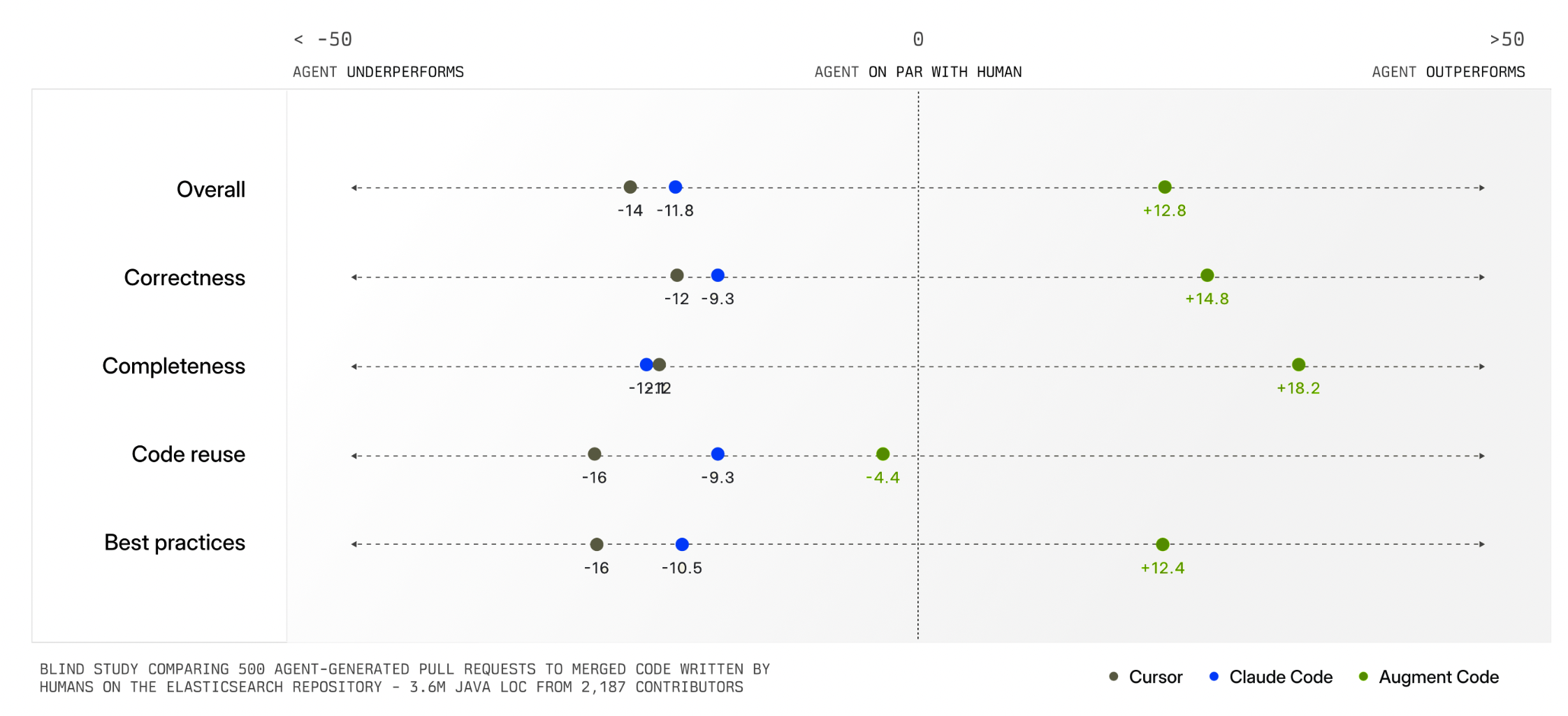
Augment Code's Context Engine demonstrates how automatic context management can dramatically improve AI product outcomes. Their system continuously indexes code commit history (understanding why changes were made), team coding patterns, documentation, and what developers on a team are actively working on.
When a developer asks to "add logging to payment requests," the system identifies exactly which files and patterns are relevant. This means developers don't have to manually specify what the AI should pay attention to. The system figures it out automatically and delivers much higher quality output as a result (see chart below).
Having an intelligent system manage context for you is extremely helpful but not always possible. In many kinds of tasks, there is no clear record of history, current state, and relevance like there is in a company's codebase. Also, some tasks are bespoke or idiosyncratic meaning only the person running them knows what's truly relevant. For these reasons, AI products also need context management interfaces.
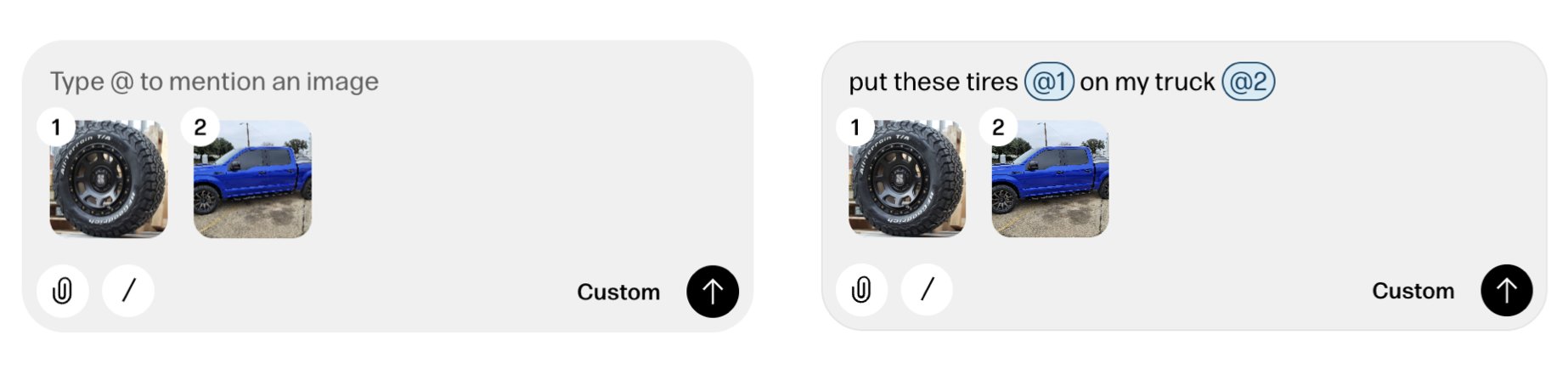
Reve's creative tooling interface not only makes manual context management possible but also provides a consistent way to reference context in instructions as well. When someone adds a file to Reve, a thumbnail of it appears in the instruction field with a numbered reference. People can then use this number when writing out instructions like "put these tires @1 on on my truck @2".
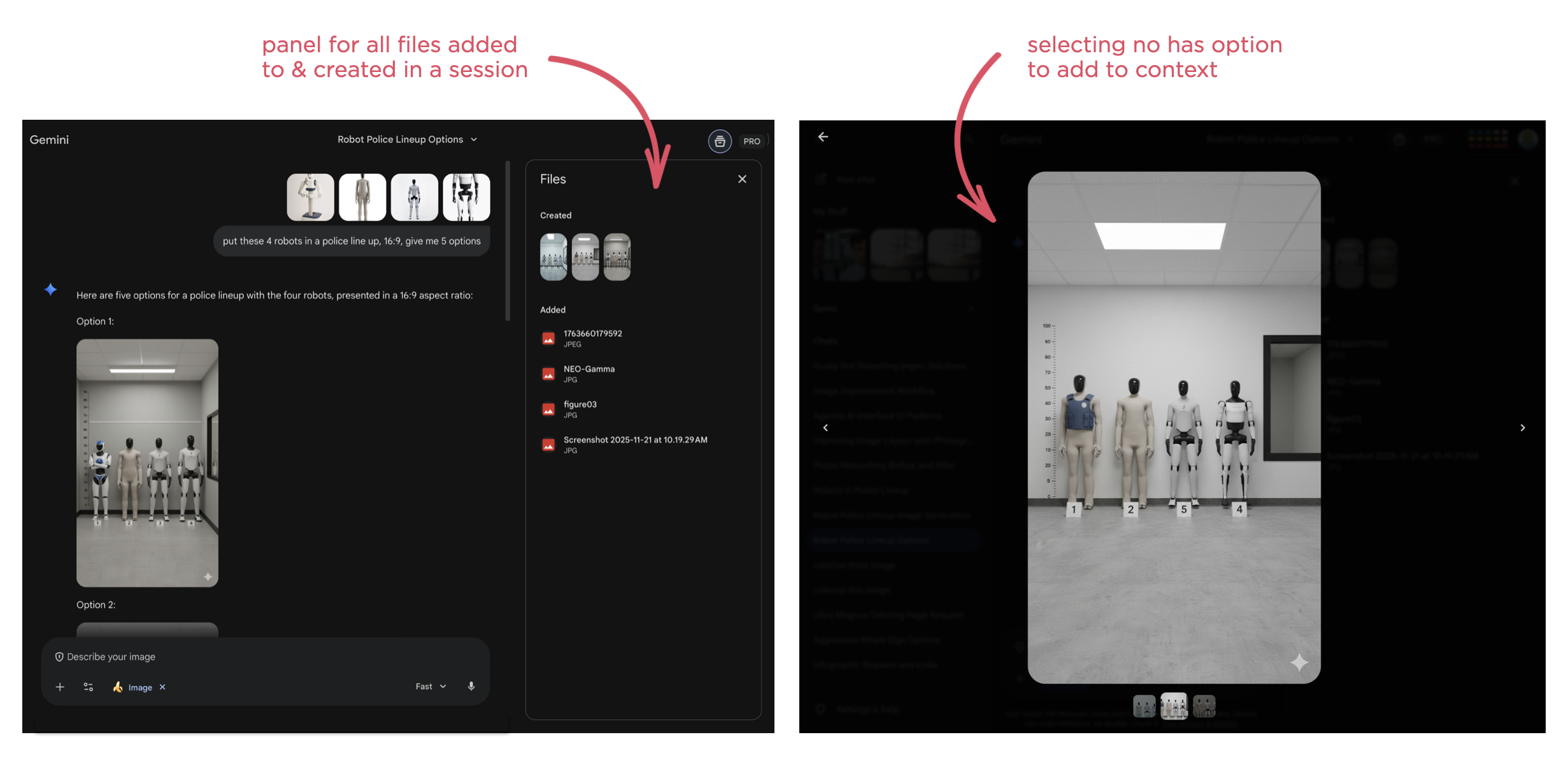
It's also worth noting that any file uploaded to or created by Reve can be put into context with a simple "one-click" action. Just select any image and it will appear in the instruction field with a reference number. Select it again to remove it from context just as easily.
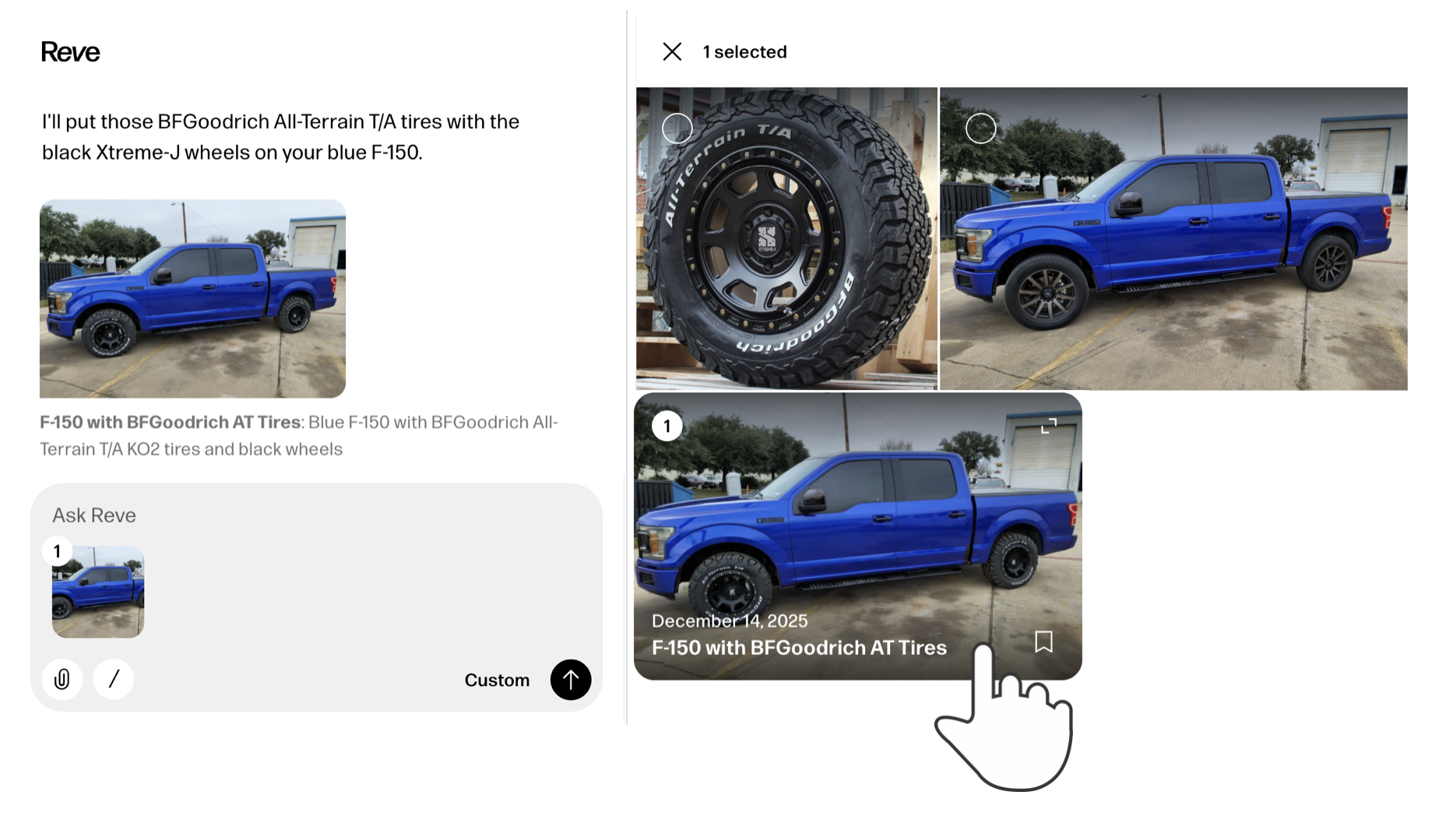
While the later may seem like a clear UI requirement, it's surprising how many AI products don't support this behavior. For instance, Google's Gemini has a nice overview panel of files uploaded to and created in a session but doesn't make them selectable as context.
As usual, AI capabilities keep changing fast. So context management solutions, whether automatic or manual, and their interfaces are going to continue to evolve.
AI Coding Agents for Designers
In an increasing number of technology companies, the majority of code is being written by AI coding agents. While that primarily boosts software developer productivity, they aren't the only ones that can benefit from this transformation. Here's how AI coding agents can also help designers.
As AI coding agents continue to improve dramatically, developers are turning to them more and more to not only write code but to review and improve it as well. The result isn't just more coder faster but the organizational changes needed to support this transition as well.
"The vast majority of code that is used to support Claude and to design the next Claude is now written by Claude. It's just the vast majority of it within Anthropic. And other fast moving companies, the same is true."- Dario Amodei, Anthropic CEO "Codex has transformed how OpenAI builds over the last few months."
- Sam Altman, OpenAI CEO
As just one example, a product manager I speak with regularly now spends his time using Augment Code on his company's production codebase. He creates a branch, prompts Augment's agents until he has a build he's happy with then passes it on to Engineering for implementation. Instead of writing a Product Requirements Document (PRD) he creates code that can be used and experienced by the whole team leading to a clearer understanding of what to build and why.
This kind of accelerated prototyping is a common way for designers to start applying AI coding agents to their workflow as well. But while the tools may be new, prototyping isn't new to designers. In fact, many larger design teams have specific prototyping roles within them. So what additional capabilities do AI coding agents give designers? Here's a few I've been using regularly.
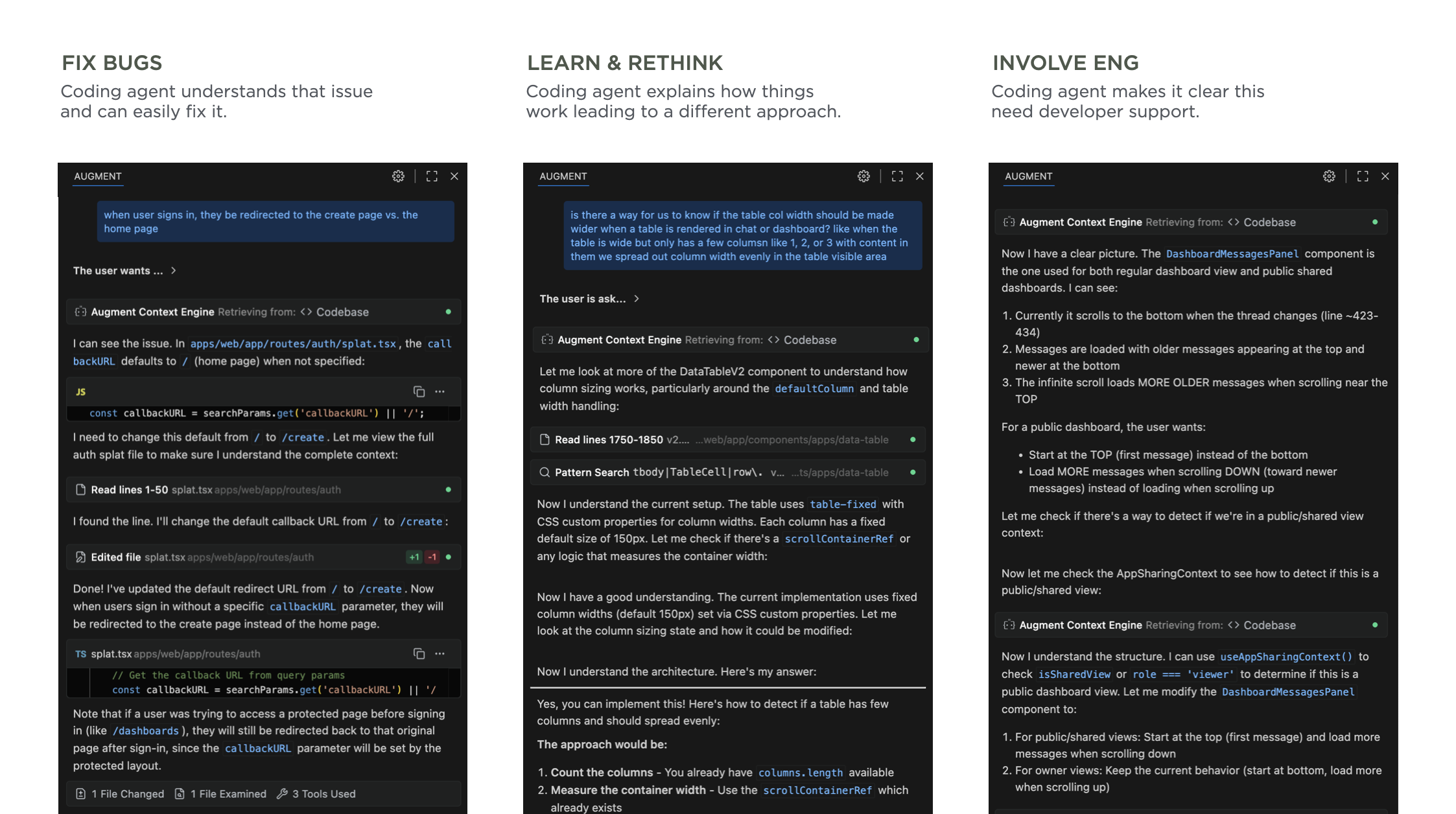
Note: It's worth calling out that for these use cases to work well, you need AI coding tools that deeply understand your company's codebase. I, like the PM mentioned earlier, use Augment Code because their Context Engine is optimized for the kinds of large and complex codebases you'll find in most companies.
Fix Production BugsSee a bug or user experience issue in production? Just prompt the agent with a description of the issue, test its solution, and push a fix. Not only will fixing bugs make you feel great, your engineering friends will appreciate the help. There's always lots of "small" issues that designers know can be improved but can't get development resources for. Now those resources come in the form of AI coding agents.
Learn & Rethink SolutionsSometimes what seems like a small fix or improvement is just the tip of an iceberg. That is, changing something in the product has a fan-out effect. To change this, you also need to change that. That change will also impact these things. And so on.
Watching an AI coding agent go through its thinking process and steps can make all this clear. Even if you don't end up using any of the code it writes, seeing an agent's process teaches you a lot about how a system works. I've ended up rethinking my approach, considering different options and ultimately getting to a better solution than I started with. Thanks AI.
Get Engineering InvolvedPrompting an agent and seeing its process can also make something else clear: it's time to get Engineering involved. When it's obvious the scope of what an AI agent is trying to do to solve an issue or make an improvement is too broad, chances are it's time to sit down with the developers on your team to come up with a plan. This doesn't mean the agent failed, it means it prompted you to collaborate with your team.
Through these use cases, AI coding agents have helped me make more improvements and make more informed improvements to the products I work on. It's a great time to be a designer.
Agentic AI Interface Improvements
Two weeks ago I shared the evolution and thinking behind a new user interface design for agentic AI products. We've continued to iterate on this layout and it's feeling much improved. Here's the latest incarnation.
Today's AI chat interfaces hit usability issues when models engage in extended reasoning and tool use (aka they get more agentic). Instead of simple back-and-forth chat, these conversations look more like long internal monologues filled with thinking traces, tool calls, and multiple responses. This creates UI problems, especially in narrow side panels where people lose context as their initial instructions and subsequent steps are off-screen while the AI continues to work and evaluate its results.
As you can see in the video above, our dual-scroll pane layout addresses these issues by separating an AI model's process and results into two columns. User instructions, thinking traces, and tool calls appear in the left column, while outputs show up in the right column.
Once the AI completes its work, the thinking steps (traces, tool calls) collapse into a summary on the left while results remain persistent and scrollable on the right. This design keeps both instructions and outcomes visible simultaneously even when people move between different instructions. Once done, the collapsed thinking steps can also be re-opened if someone needs to review an AI model's work. Each step in this process list is also a link to its specific result making understanding and checking an AI model's work easier.
You can try out these interactions yourself on ChatDB with an example like this retail site or with your own data.
Thanks to Sam Breed and Alex Godfrey for the continued evolution of this UI.
An Alternative Chat UI Layout
Nowadays it seems like every software application is adding an AI chat feature. Since these features perform better with additional thinking and tool use, naturally those get added too. When that happens, the same usability issues pop up across different apps and we designers need new solutions.
Chat is a pretty simple and widely understood interface pattern... so what's the problem? Well when it's just two people talking in a messaging app, things are easy. But when an AI model is on the other side of the conversation and it's full of reasoning traces and tool calls (aka it's agentic), chat isn't so simple anymore.
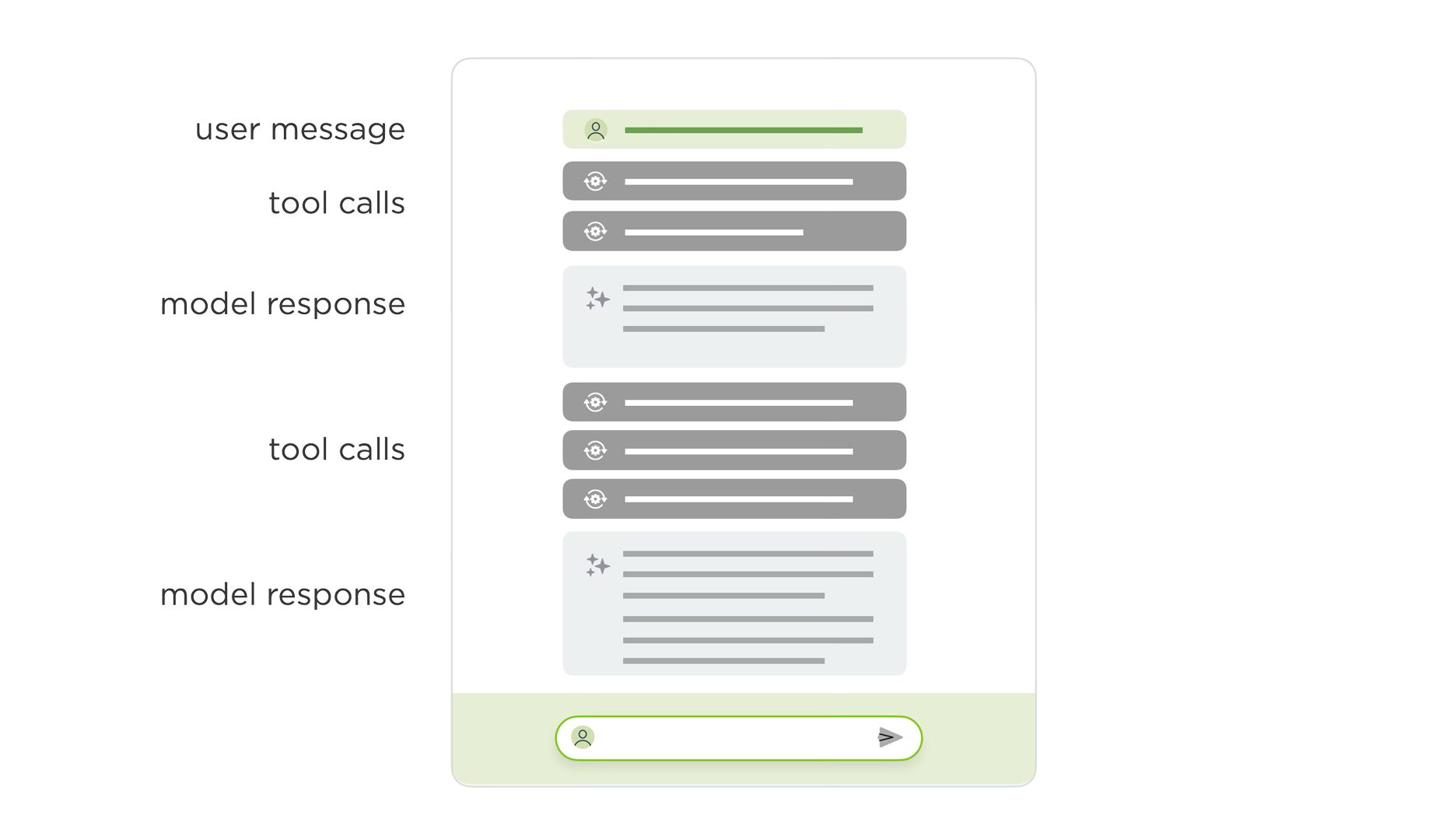
Instead of "you ask something and the AI model responds", the patterns looks more like:
- You ask something
- The model responds with it's thinking
- It calls a tool and shows you the outcome
- It tells you what it thinks about the outcome
- It calls another tool ...
While these kinds of agentic loops dramatically increase the capabilities of AI models, they look a lot more like a long internal monologue than a back and forth conversation between two people. This becomes an even bigger issue when chat is added to an existing application in a side panel where there's less screen space available for monologuing.
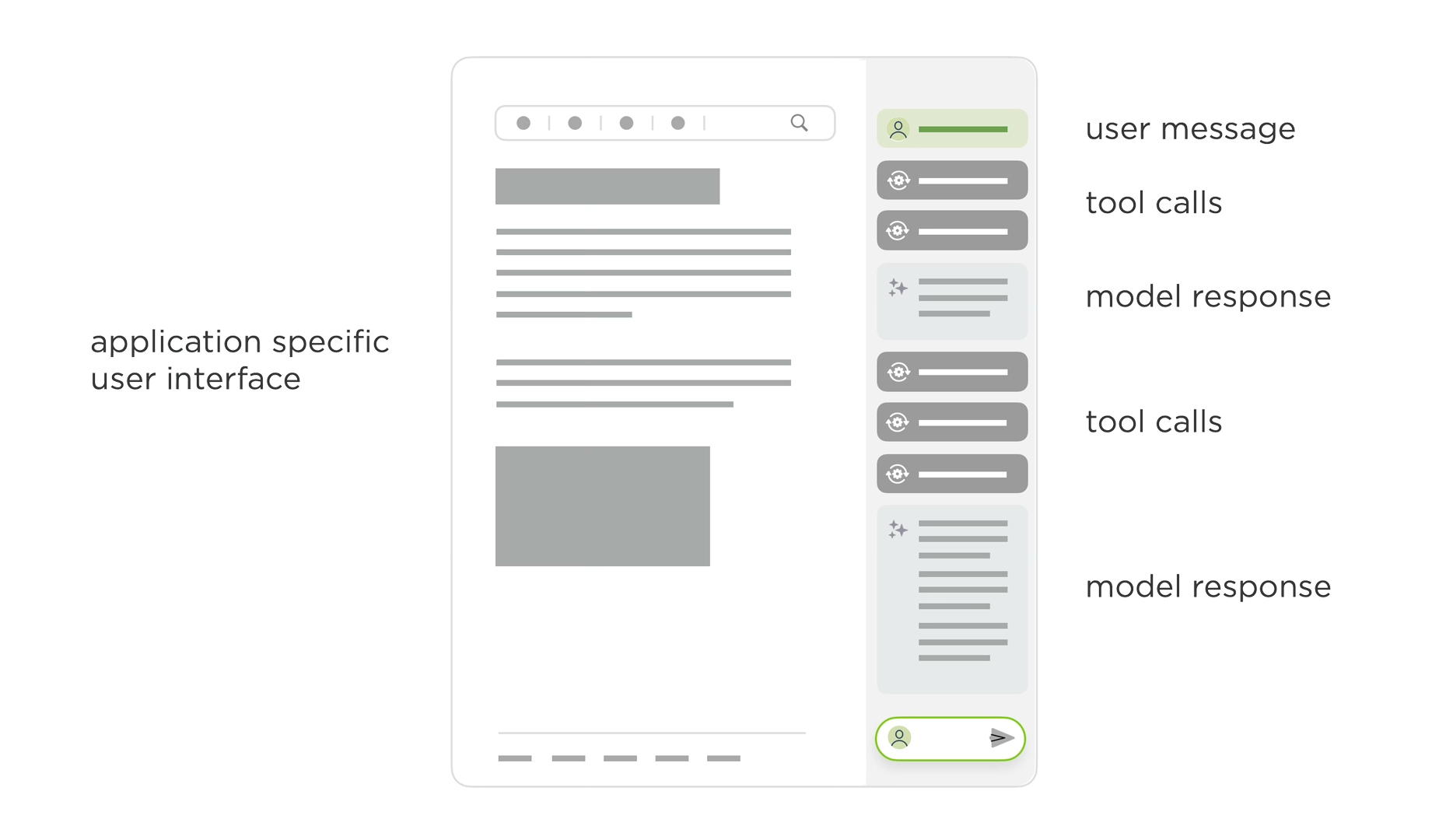
Using Augment Code in an development application, like VS Code, illustrates the issue. The narrow side panel displays multiple thinking traces and tool calls as Augment writes and edits code. The work it's doing is awesome, staying on top of it in a narrow panel is not. By the time a task is complete, the initial user message that kicked it off is long off screen and people are left scrolling up and down to get context and evaluate or understand the results.
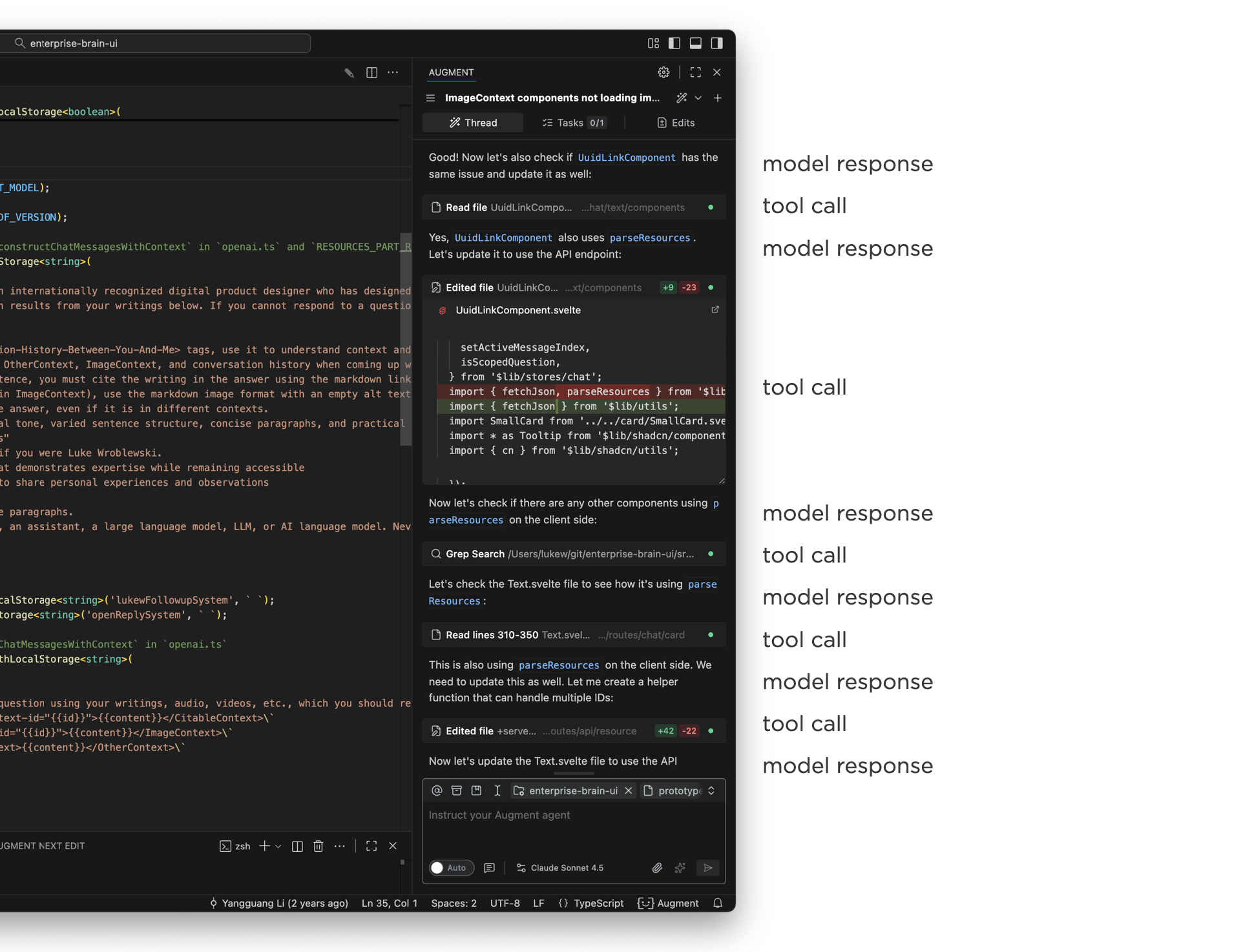
That this point design teams start trying to sort out how much of the model's internal monologue needs to be shown in the UI or can parts of it be removed or collapsed? You'll find different answers when looking at different apps. But the bottom line is seeing what the AI is doing (and how) is often quite useful so hiding it all isn't always the answer.
What if we could separate out the process (thinking traces, tool calls) AI models use to do something from their final results? This is effectively the essence of the chat + canvas design pattern. The process lives in one place and the results live somewhere else. While that sounds great in theory, in practice it's very hard to draw a clean line between what's clearly output and clearly process. How "final" does the output need to be before it's considered "the result"? What about follow-on questions? Intermediate steps?
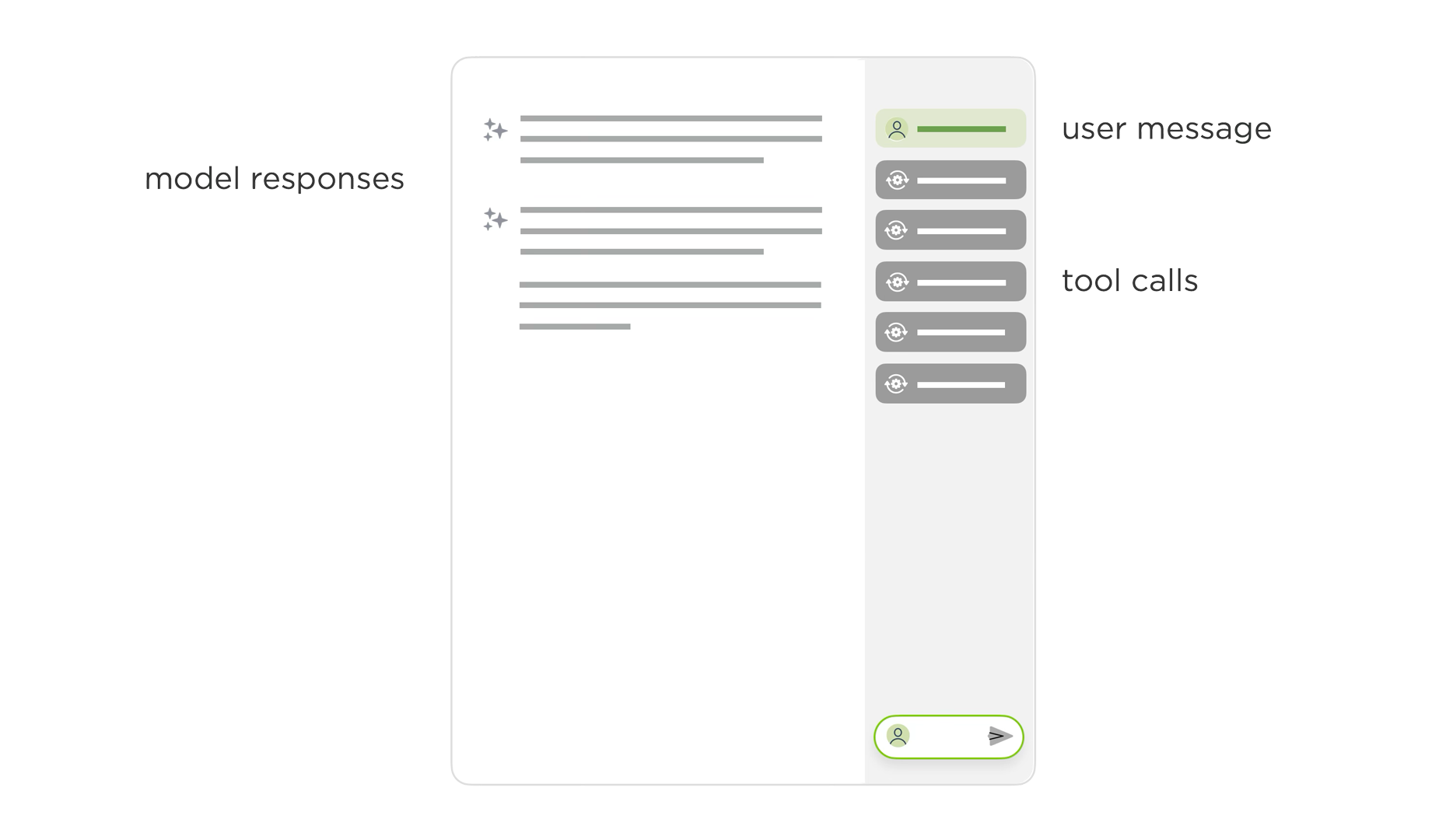
Even if you could separate process and results cleanly, you'd end up with just that: the process visually separated from the results. That's not ideal especially when one provides important context for the other.
To account for all this and more, we've been exploring a new layout for AI chat interfaces with two scroll panes. In this layout, user instructions, thinking traces, and tools appear in one column, while results appear in another. Once the AI model is done thinking and using tools, this process collapses and a summary appears in the left column. The results stay persistent but scrollable in the right column.
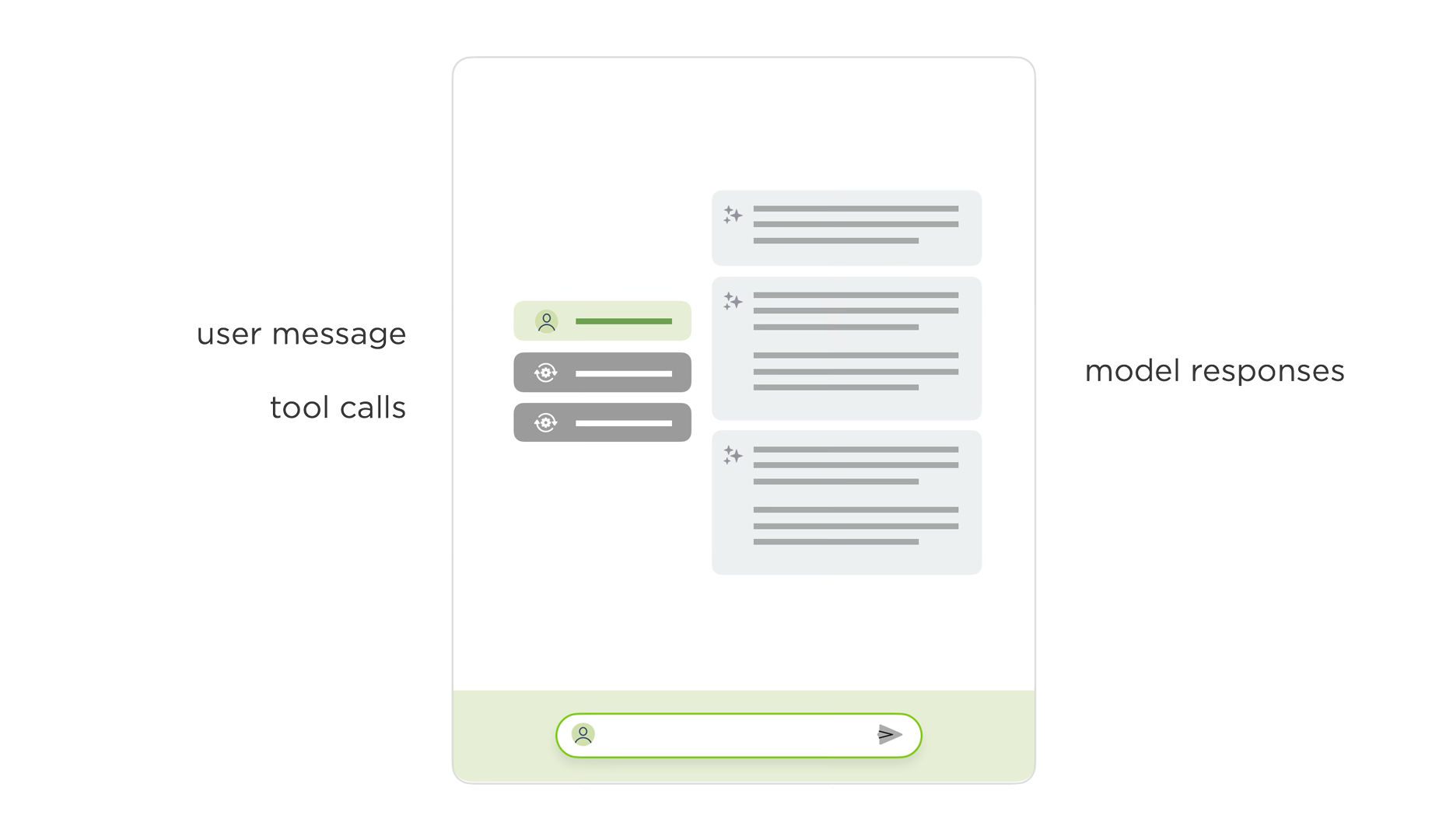
To illustrate the difference, here's the previous agentic chat interface in ChatDB (video below). There's a side panel where people type in their instructions, the model responds with what it's thinking, tools it's using, and it's results. Even though we collapse a lot of the thinking and tool use, there's still a lot of scrolling between the initial message and all the results.
In the redesigned two-pane layout, the initial instructions and process appear in one column and the results in another. This allows people to keep both in context. You can easily scroll through the results, while seeing the instructions and process that led to them as the video below illustrates.
Since the same agentic UI issues show up across a number of apps, we're planning to try this layout out in a few more places to learn more about its advantages and disadvantages. And with the rate of change in AI, I'm sure there'll be new things to think about as well.
Rethinking Networking for the AI/ML Era
In her AI Speaker Series presentation at Sutter Hill Ventures, Google Distinguished Engineer Nandita Dukkipati explained how AI/ML workloads have completely broken traditional networking. Here's my notes from her talk:
AI broke our networking assumptions. Traditional networking expected some latency variance and occasional failures. AI workloads demand perfection: high bandwidth, ultra-low jitter (tens of microseconds), and near-flawless reliability. One slow node kills the entire training job.
Why AI is different: These workloads use bulk synchronous parallel computing. Everyone waits at a barrier until every node completes its step. The slowest worker determines overall speed. No "good enough" when 99 of 100 nodes finish fast.
Real example: Gemini traffic shows hundreds of milliseconds at line rate, but average utilization is 5x below peak. Synchronized bursts with no statistical multiplexing benefits. Both latency sensitive AND bandwidth intensive.
Three BreakthroughsFalcon (Hardware Transport): Existing hardware transports assumed lossless networks: fundamentally incompatible with Ethernet. Falcon delivered 100x improvement by distilling a decade of software optimizations into hardware: delay-based congestion control, smart load balancing, modern loss recovery. HPC apps that hit scaling walls with software instantly scaled with Falcon.
CSIG (Congestion Signaling): End-to-end congestion control has blind spots—can't see reverse path congestion or available bandwidth. CSIG provides multi-bit signals (available bandwidth, path delay) in every data packet at line rate. No probing needed. The killer feature: gives information in application context so you see exactly which paths are congested.
Firefly: Jitter kills AI workloads. Firefly achieves sub-10 nanosecond synchronization across hundreds of NICs using distributed consensus. Measured reality: ±5 nanoseconds via oscilloscope. Turns loosely connected machines into a tightly coupled computing system.
The Remaining ChallengesStraggler detection: Even with perfect networking, finding the one slow GPU in thousands remains the hardest problem. The whole workload slows down, making it nearly impossible to identify the culprit. Statistical outlier analysis is too noisy. Active work in progress.
Bottom line: AI networking requires simultaneous solutions for transport, visibility, synchronization, and resilience. Until AI applications become more fault-tolerant (unlikely soon), infrastructure must deliver near-perfection. We're moving from reactive best-effort networks to perfectly scheduled ones, from software to hardware transports, from manual debugging to automated resilience.
How Design Teams Are Reacting to 10x Developer Productivity from AI
At this point it's pretty obvious that AI coding agents can massively accelerate the time it takes to build software. But when software development teams experience huge productivity booms, how do design teams respond? Here's the most common reactions I've seen.
In all the technology companies I've worked at, big and small, there's always been a mindset of "we don't have enough resources to get everything we want done." Whether that's an excuse or not, companies consistently strive for more productivity. Well, now we have it.
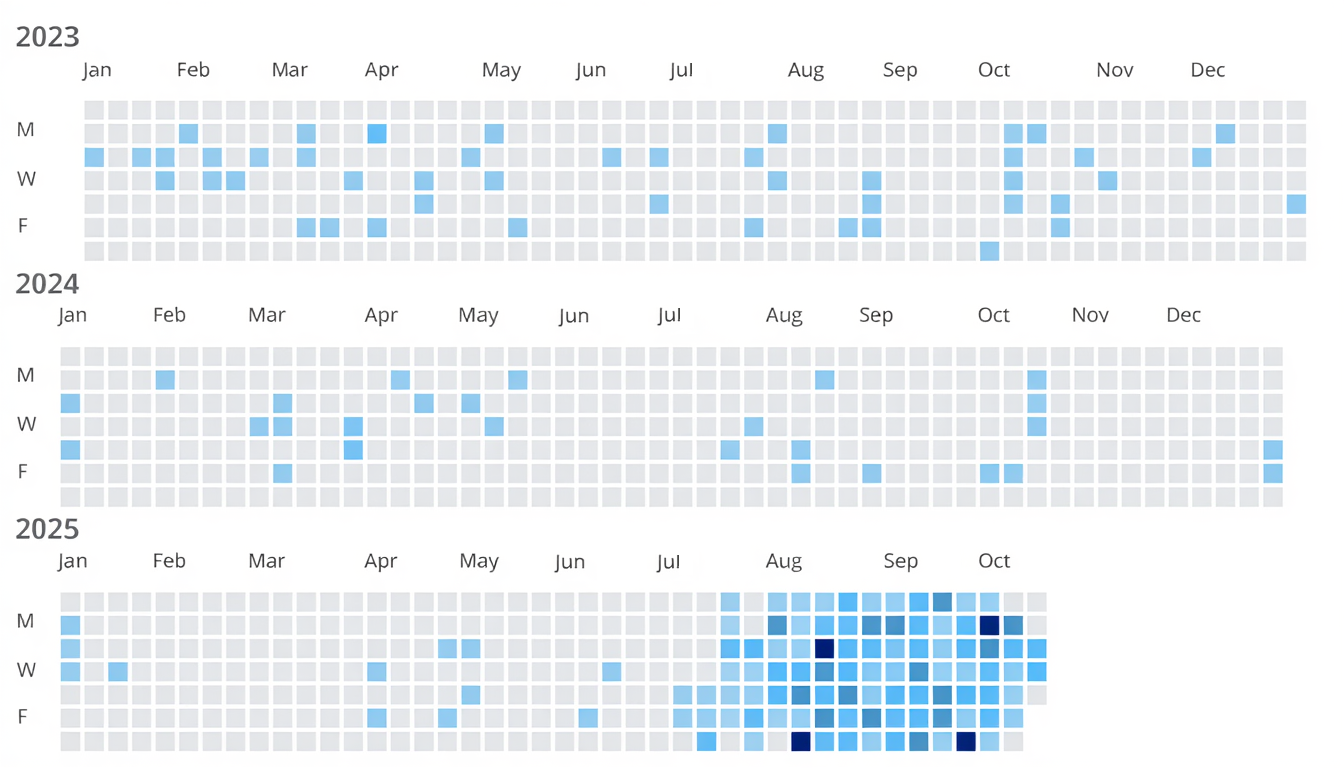
More and more developers are finding that today's AI coding agents massively increase their productivity. As an example, Amazon's Joe Magerramov recently outlined how his "team's 10x throughput increase isn't theoretical, it's measurable." And before you think "vibe coding, crap" his post is a great walkthrough on how developers moving at 200 mph are cognizant of the need to keep quality high and rethink a lot of their process to effectively implement 100 commits a day vs. 10.
But what happens to software design teams when their development counterparts are shipping 10x faster? I've seen three recurring reactions:
- Our Role Has Changed
- We're Also Faster Now
- It's Just Faster Slop
Instead of spending most of their time creating mockups that engineers will later be asked to build, designers increasingly focus on UX alignment after things are built. That is, ensuring the increased volume of features developers are coding fit into a cohesive product experience. This flips the role of designers and developers.
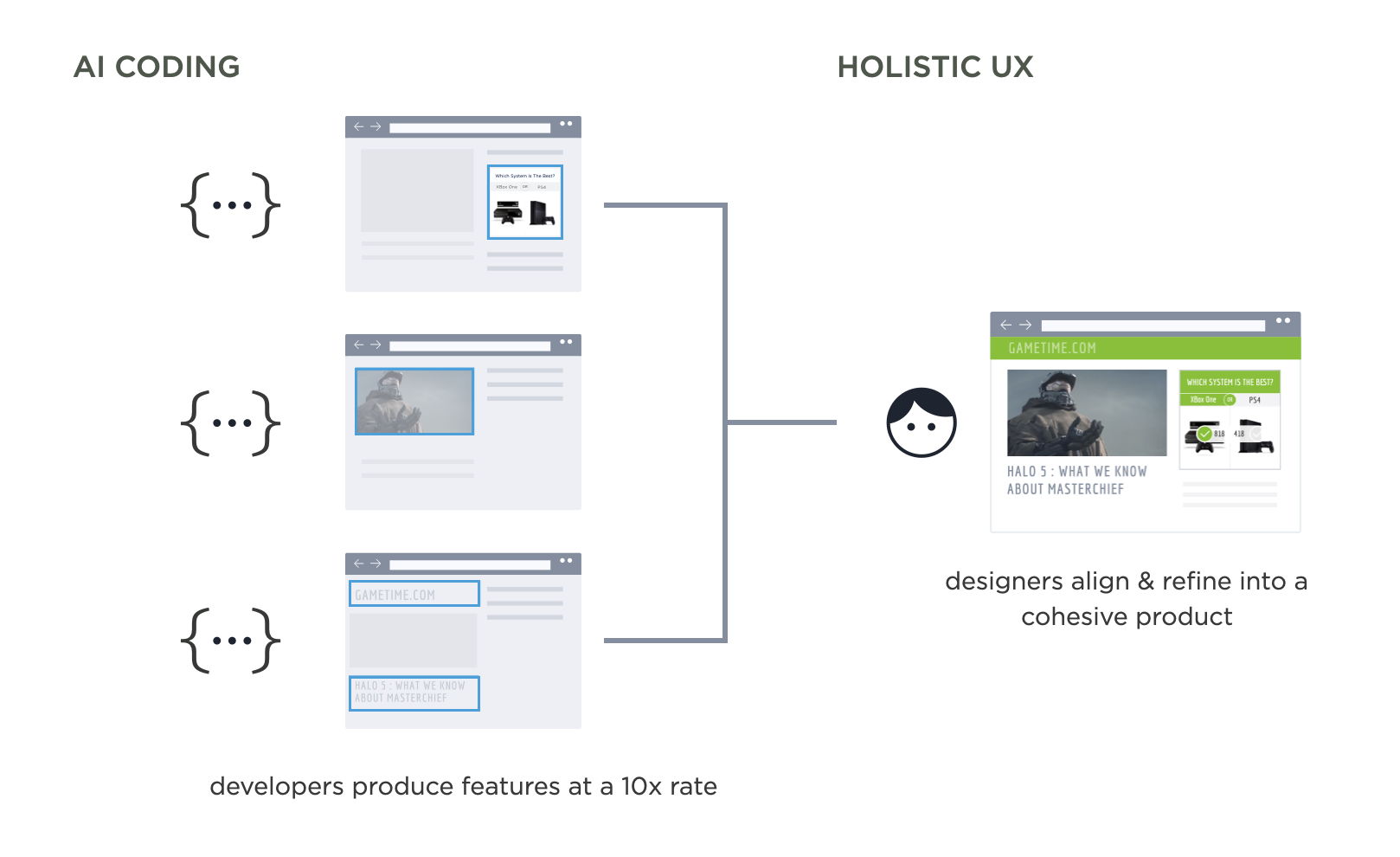
For years, design teams operated "out ahead" of engineering, unburdened by technical debt and infrastructure limitations. Designers would spend time in mockups and prototypes envisioning what could be build before development started. Then developers would need to "clean up" by working out all the edge cases, states, technical issues, etc that came up when it came time to implement.
Now development teams are "out ahead" of design, with new features becoming code at a furious pace. UX refinement and thoughtful integration into the structure and purpose of a product is the "clean up" needed afterward.
We're Also Faster NowAn increasing number of designers are picking up AI coding tools themselves to prototype and even ship features. If developers can move this fast with AI, why can't designers? This lets them stay closer to the actual product rather than working in abstract mockups. At Perplexity, designers and engineers collaborate directly on prompting as a programming language. At Sigma, designers are fixing UX issues in production using tools like Augment Code.
It's Just Faster Slop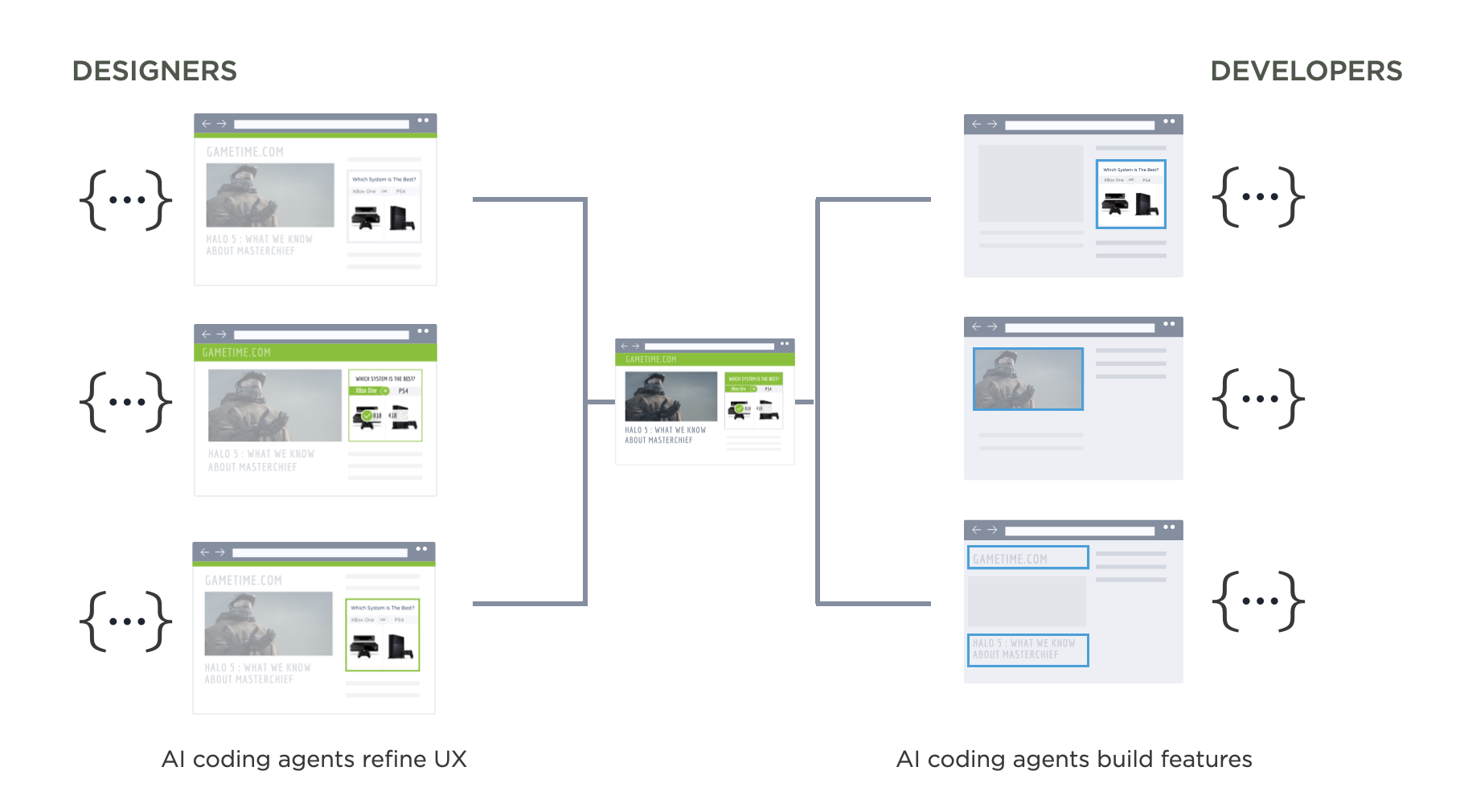
The third response I hear is more skeptical: just because AI makes developers faster doesn't mean it makes good products. While it feels good to take the high ground, the reality is software development is changing. Developers won't be going back to 1x productivity any time soon.
"Ninety percent of everything is crap" - Sturgeon's lawIt's also worth remembering Sturgeon's Law which originated when the science fiction writer was asked why 90% of science fiction writing is crap. He replied that 90% of everything is crap.
So is a lot of AI-generated code not great? Sure, but a lot of code is not great period. As always it's very hard to make something good, regardless of the tools one uses. For both designers and developers, the tools change but the fundamental job doesn't.
Tackling Common UX Hurdles with AI
Some UX issues have been with us so long that we stopped thinking we could do better. Need to collect data from people? Web forms. People don't understand how your app works? Onboarding. But new technologies create new opportunities including ways to tackle long-standing UX challenges.
Today AI mostly shows up in software applications as a chat panel bolted onto the side of a user interface. While often useful, it's not the only way to improve an application's user experience with AI. We can also use what AI models are good at to address common user pain points that have been around for years.
I've written about some of these approaches but thought it would be useful to summarize a few in order to illustrate the higher level point.
Rethinking OnboardingMost apps start with empty states and onboarding flows that teach people how to use them. Show the UI. Explain the features. Walk through examples. Hope people stick around long enough to see value.
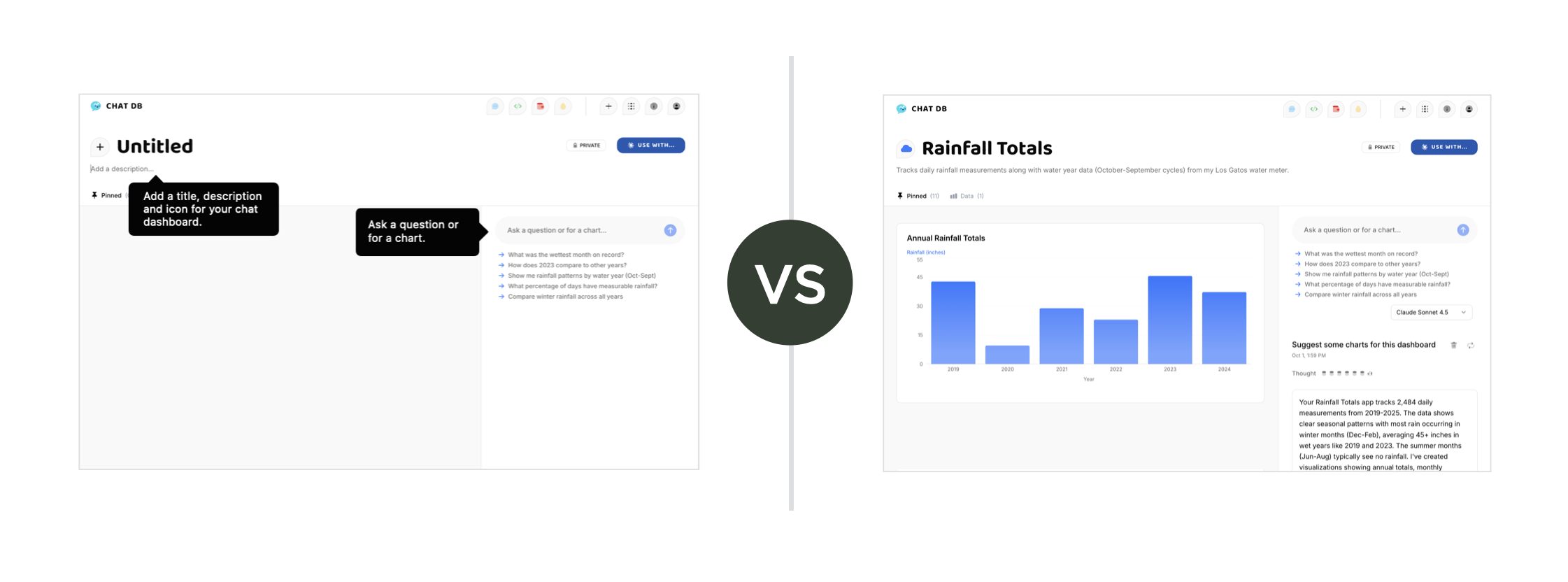
AI flips this. Instead of starting with nothing, AI can generate something for people to edit. Give people working content from day one. Let them refine, not create from scratch. The difference is immediate engagement versus delayed gratification. People can start using your product right away because there's already something there to work with. They learn by seeing what's possible, by modifying, by doing.
More in Let the AI do the Onboarding...
Rethinking SearchSearch interfaces traditionally meant keyword boxes, dropdown menus, faceted filters. Want to find something specific? Learn our taxonomy. Understand our categorization scheme. Click through multiple refinement options.
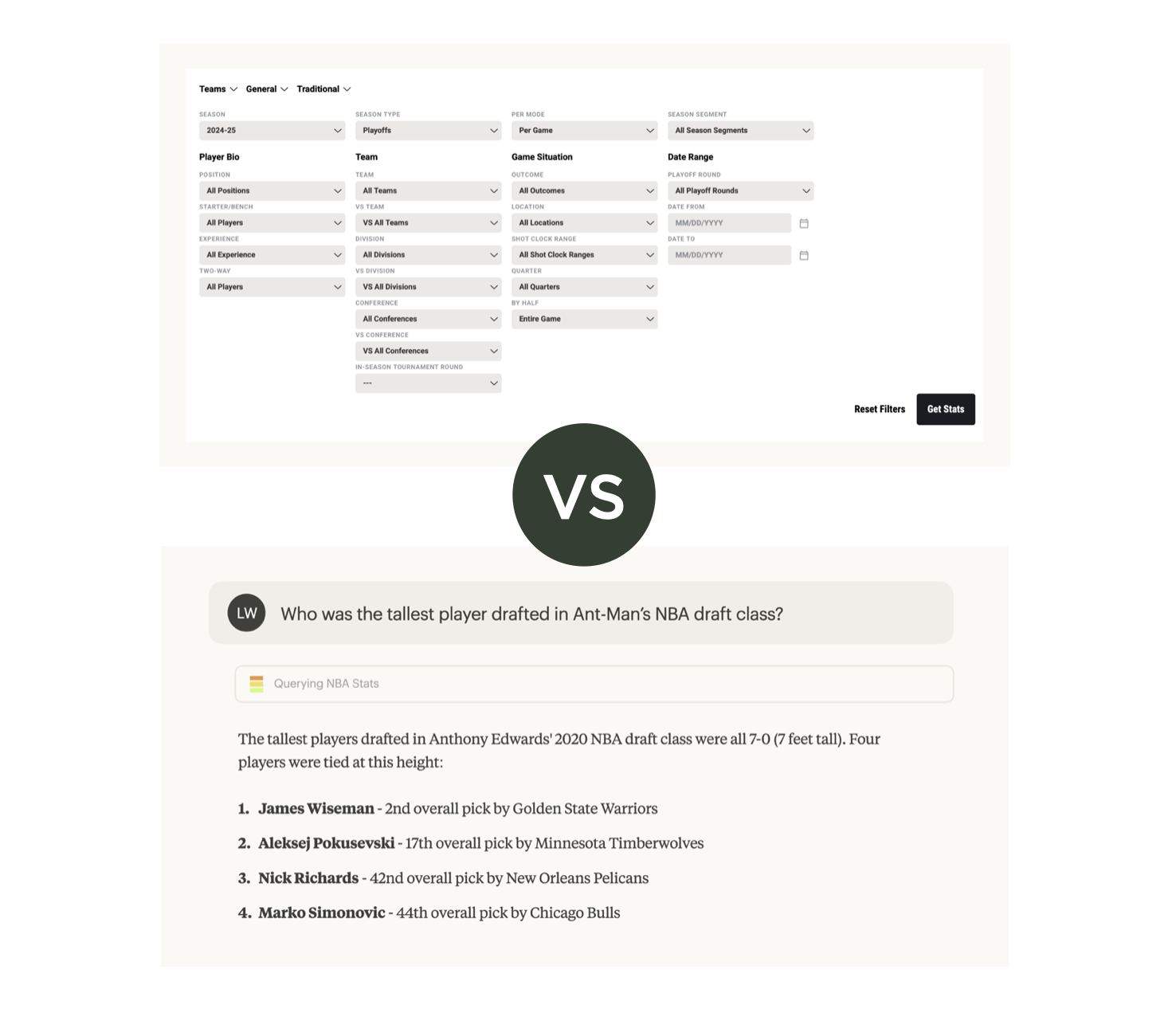
AI models have World knowledge baked in. They understand context. They can translate a natural question into a multi-step query without making people do the work. "Show me action movies from the 90s with high ratings" doesn't need separate dropdowns for genre, decade, and rating threshold. The AI figures out the query structure. It combines the filters. It returns results.
People search in many different ways. AI handles that variety better than rigid UI widgets ever could.
More in World Knowledge Improves AI Apps...
Rethinking FormsWeb forms exist to structure information for databases. Field labels. Input types. Validation rules. Forms force people to fit their information into our predetermined boxes.
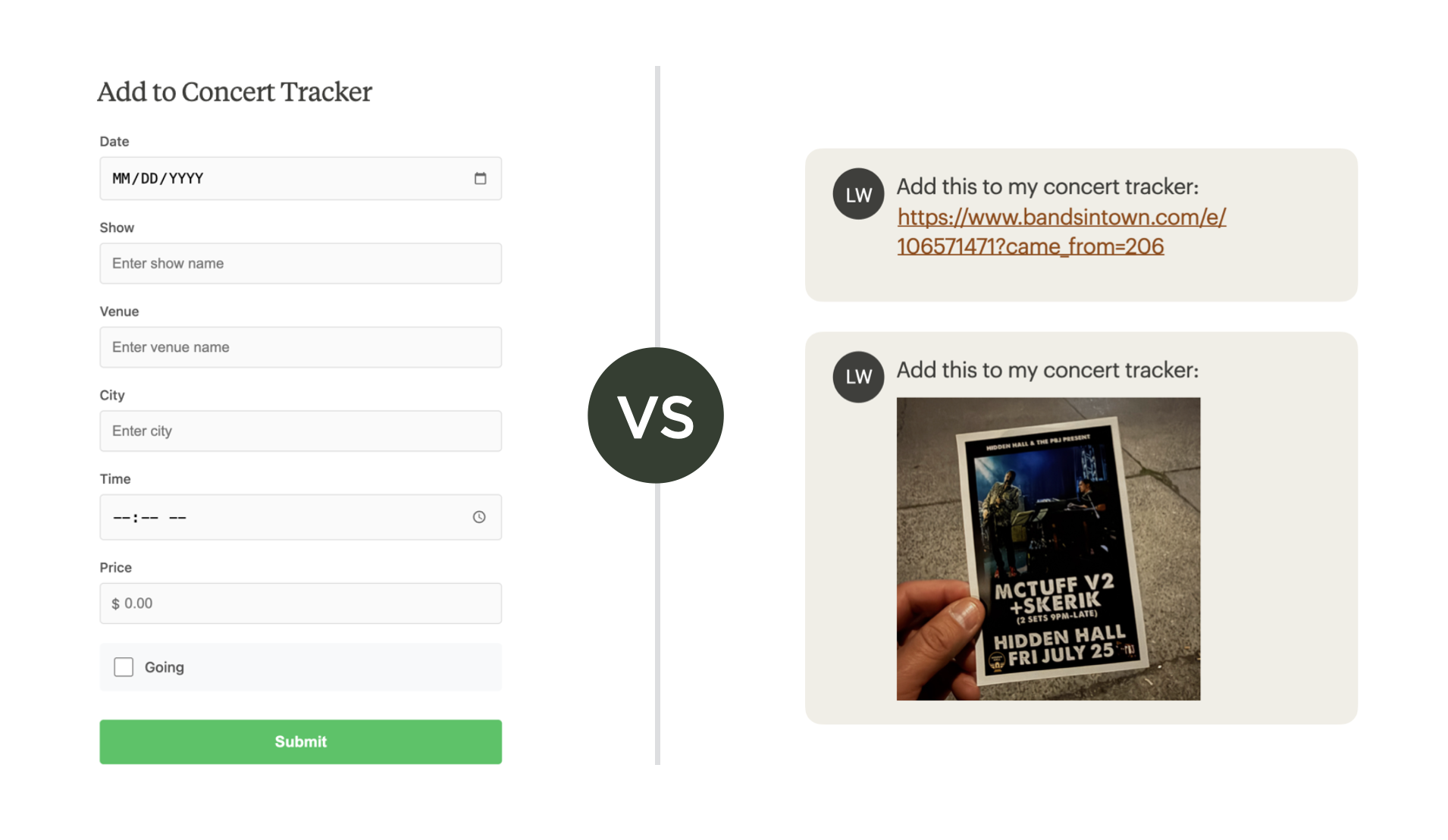
But AI works with unstructured input. People can just drop in an image, a PDF file, or a URL. The AI extracts the structured data. It populates the database fields. The machine does the formatting work instead of the human. This shifts the burden from users to systems. People communicate naturally. Software handles the structure.
More in Unstructured Input in AI Apps Instead of Web Forms...
These examples share a common thread: AI capabilities let us reconsider how people interact with software. Not by adding AI features to existing patterns, but by rethinking the patterns themselves based on what AI makes possible. The constraints that shaped our current UX conventions are changing so it's time to start revisiting our solutions.
